


Pocket Bard
4.8424.00 Reviews
App Specs
- Version
- 3.1.17
- Updated On
- License
- Free
- Downloads
- 500,000+
- Developer
- Pocket Bard Inc.
- Categories
- Music & Audio
- Platform
- Android
Screenshots
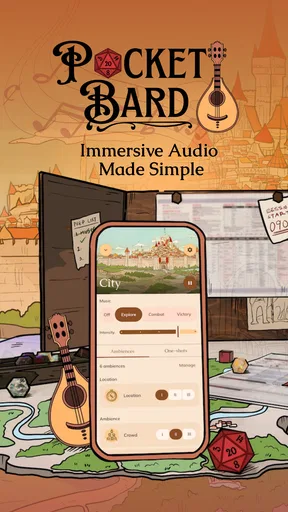
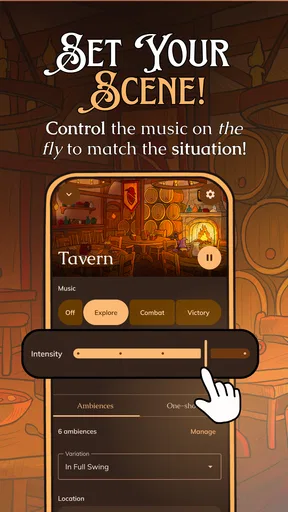
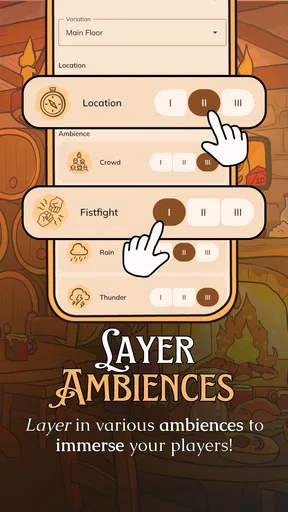
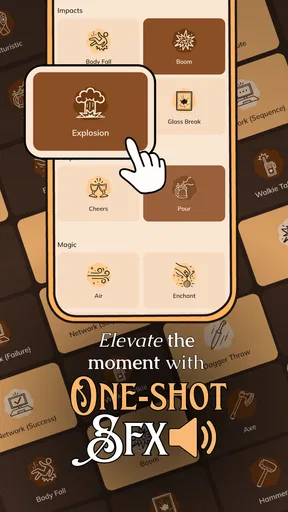
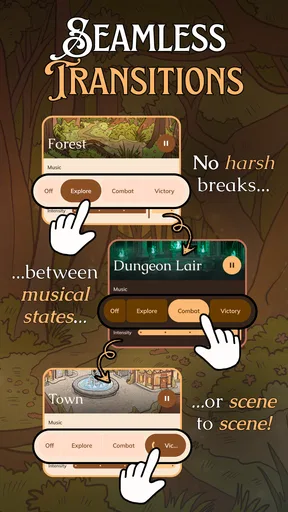
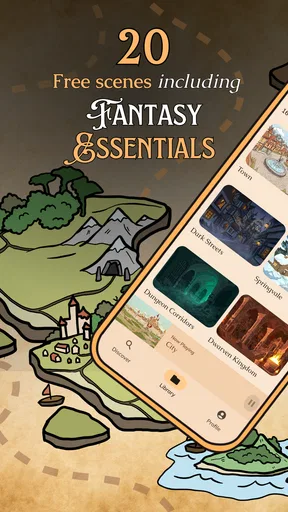

 Analysis by AppCompare
When I’m choosing audio for a tabletop role-playing session, I care less about having endless tracks than about being able to set a mood without taking attention away from the table. Pocket Bard is aimed at that particular job: it gives a game master a phone-based way to bring sound into a shared story. I’d consider it when atmosphere matters, but I wouldn’t treat it as a replacement for a general music player or a tool for composing a finished soundtrack.
That distinction is useful before you install anything. A tabletop group may need a low, steady sound for a tense conversation, a change in mood when a scene shifts, or a quick way to make a location feel different. The best audio setup is one the group can live with for a whole session, not one that demands constant fiddling. Pocket Bard is most compelling if you want sound to serve the scene and you’re willing to manage it as part of running the game.
Choose it for the kind of session you run
I’d first ask how much control you want while you’re playing. If you enjoy setting up scenes and treating sound as one more storytelling tool, a dedicated tabletop audio app makes more sense than searching through a general streaming library every time the party enters a new place. If you prefer to improvise with no preparation, a large collection of familiar music or a simple speaker playing background audio may feel easier.
There’s also a group question. A subtle background layer can help establish a shared atmosphere, but it is not automatically an improvement for every table. Players who find continuous sound distracting, or who need to hear every word clearly, may prefer silence or occasional effects. I’d start with a short test during a low-stakes scene and ask the group whether the sound helps them focus. That small check can prevent a mood-setting idea from becoming noise everyone has to tolerate.
Where a tabletop-focused sound tool helps
The practical advantage of using an app made for role-playing is the intent behind it: you’re thinking in terms of the scene, not simply choosing an album. That can make it easier to keep the audio connected to what is happening around the table. Pocket Bard is an app in the Music & Audio category, developed by Pocket Bard Inc., and its niche is clearest when the person controlling it is also shaping the session.
A useful approach is to prepare a few scene changes before players arrive rather than browsing while they wait. I’d decide on a starting mood, one contrasting option for a major shift, and a quiet fallback. That keeps the game master’s attention on the players instead of the phone. It also gives you a simple way to tell whether audio is adding something: if you keep interrupting the scene to adjust it, the setup is asking too much of you.
For a regular weekly group, this kind of preparation can become part of the session routine. For a one-shot, a short list of sounds tied to the main locations may be enough. Either way, the aim is not to soundtrack every minute. Silence can give a dramatic reveal or an important conversation more room, so I would treat audio as something to bring in selectively rather than leave running by default.
Worth Reading Before You Choose

Flipboard Shows What News Apps Must Do Beyond the Feed

Switching to Android Auto Means Rethinking Your Driving Routine

Google Calendar Makes a Crowded Week Easier to Manage

Ludo King Makes the Most of the Minutes Between Plans

Baby Panda World Brings Quick Play to Modern Phones, but Its Game Library Feels Busy

ESPN’s Live Game View Makes Following Close Games Easier
When another option is the better fit
Compared with a general-purpose music player, a tabletop-oriented tool is a more natural choice when the audio needs to follow fictional scenes. A music streaming service may be better if your priority is familiar songs, broad listening outside game night, or a playlist you already know how to manage. A soundboard can suit a group that mainly wants a few punctual effects, while a simple speaker and a carefully chosen background track may be enough for a casual session.
Those alternatives have their own trade-offs. A broad music library can offer plenty of choice but may turn scene-setting into a search task. A soundboard is quick for isolated cues but may not provide the ongoing atmosphere a game master wants. Pocket Bard makes the most sense when the purpose is tied to tabletop play; if your main goal is to listen to music on a commute, practice an instrument, or record songs, I’d choose a tool built around that activity instead.
My other caution is about attention. It is easy to overestimate how much audio a session needs, especially when preparing a dramatic encounter. I’d avoid trying to control a soundtrack continuously while also tracking initiative, character decisions, and the story. Assigning a player to handle sound can help if they are happy to do it, but it should be an optional task rather than an expectation. If nobody wants that role, keep the setup simple.
What to consider before making it part of your routine
The app is free to install, with in-app purchases ranging from about seven to fifty dollars per item. I’d try the free experience in the kind of session where I actually plan to use it before deciding whether a purchase is worthwhile. The key test is not whether the idea sounds appealing; it is whether the controls and available choices fit your table’s habits well enough that you reach for them again.
Its audience rating is Teen. The app has an average rating of 4.4 from around 2,600 ratings, with over 100,000 installs. Those figures suggest it has found an audience, but they don’t tell me whether it will suit a particular group. I’d put more weight on a practical trial: can you make a scene change without losing the conversation, and does the sound stay welcome after the novelty wears off?
If you decide to switch from another audio method, don’t rebuild your whole session around the app on day one. Keep your usual fallback available, prepare only a small set of moments where audio could help, and see how the group responds. That makes it easy to return to your old approach if the phone becomes a distraction. It also gives you a fair comparison between a purpose-built tabletop setup and the playlists, effects, or silence you already use.
The app was released on February 10, 2023, and its current version is 3.0.25. It requires Android 9 or later. Before a game night, I’d check that the device you plan to use meets that requirement and make sure you are comfortable operating the audio from where you sit. Even a well-chosen sound is less useful if managing it means repeatedly stepping away from the table.
A common concern is whether this kind of app will work for every role-playing game. I’d judge that by your group’s style rather than the game’s genre: if you use locations, tension, and scene changes as part of the storytelling, audio may have a clear role; if your sessions are mostly conversation and you like a quiet table, it may add little. Another sensible question is whether it can replace the music app you already use. I wouldn’t assume so. Its value is in supporting tabletop play, not serving every listening need.
I’d also think about who will control the phone and how much sound is appropriate for the room. In a small group, placing the device where everyone can hear it without turning it up too far is usually more considerate than treating it like a performance speaker. If you play online, your group’s existing audio setup may matter more than the app itself; test the arrangement before an important session rather than finding out mid-scene that background audio competes with voices.
One low-effort experiment is to use sound only at transitions: when the group reaches a new place, when a calm scene turns uneasy, or when a pause needs a little texture. Keep spoken dialogue clear and let the group’s response guide you. This is more informative than filling an entire session with background audio, because you can tell which moments benefit and which are stronger without it.
A Journey into the World of Music and Storytelling
From the moment you launch Pocket Bard, you’re greeted with an interface that’s as charming as a well-told tale. It’s intuitive, making it easy for both seasoned bards and beginners to navigate. You know that feeling when you pick up a book and just can’t put it down? That’s exactly how I felt exploring this app.
Features that Hit the Right Note
Pocket Bard comes packed with a variety of features designed to enrich your creative journey. There’s a library of musical instruments at your fingertips, from lutes to harps, each with its own unique sound. I spent hours just experimenting with different combinations, crafting my own symphonies.
The storytelling tools are equally impressive. You can create and store stories, complete with character development and plot twists. It’s like having a digital notebook that helps you weave your narratives seamlessly. And let’s not forget the inspiration section, filled with prompts and ideas to get your creative juices flowing.
Making Music Magic
One of the standout features for me was the music composition tool. It’s user-friendly, allowing you to compose, edit, and play your own tunes. Whether you're a musician or just someone who loves to dabble in music, this tool is a delight. There’s something magical about playing a melody you’ve crafted yourself, and this app makes it possible without needing a degree in music theory.
The app also supports collaborative projects. So, if you’re someone who loves making music with friends, you can invite them to join your creative process. It’s like having a mini orchestra in your pocket, ready to bring your compositions to life.
Storytelling Like a Pro
Now, onto the storytelling aspect. Imagine having a dedicated space to jot down your thoughts, develop characters, and even plan out entire story arcs. That’s exactly what Pocket Bard offers. The app makes it easy to organize your ideas, ensuring your tales are as captivating as you envision them.
For those moments when you’re stuck, the built-in prompts and inspiration can be a lifesaver. I found myself pulling from these prompts to kickstart my creativity, crafting stories I hadn’t even imagined before. It’s like having a mentor by your side, guiding you through your creative blocks.
Final Thoughts: A Bard’s Best Friend
After spending significant time with Pocket Bard, I can confidently say it’s a must-have for anyone with a passion for music and storytelling. It’s not just an app; it’s a creative companion that’s always ready to help you craft your next masterpiece. Whether you’re an aspiring bard or a seasoned storyteller, there’s something here for everyone.
So, if you’ve got a story to tell or a tune to play, why not give Pocket Bard a try? It might just be the magical muse you’ve been searching for. Happy storytelling, fellow bards!
Pros
- User-friendly interface for easy navigation.
- Extensive library of music and sounds.
- Regular updates with new content.
- Offline access for convenience.
- Customizable playlists for different moods.
Cons
- Limited free features compared to premium.
- Requires significant storage space.
- Occasional app crashes reported.
- In-app ads can be intrusive.
- No option for user-generated content.
FAQs for Pocket Bard
What is Pocket Bard and how does it work?
Pocket Bard is an innovative app designed for both Android and iOS that immerses users in the world of interactive storytelling. It uses AI-driven narratives to generate unique stories based on user input. Simply choose your setting, characters, and plot elements, and Pocket Bard crafts a personalized tale, ideal for both casual readers and budding writers.
Is Pocket Bard suitable for children?
Yes, Pocket Bard includes content filters that allow parents to set appropriate age levels for their children. With a variety of child-friendly themes and stories, it provides a safe and engaging platform for young readers to explore creativity and improve their literacy skills, while still offering more complex narratives for older users.
Does Pocket Bard require an internet connection?
Pocket Bard primarily functions offline, allowing users to enjoy stories without needing a constant internet connection. However, accessing certain features like community story sharing or updates may require online connectivity. This makes it convenient for traveling or when you’re in locations with limited internet access.
How customizable are the stories in Pocket Bard?
Pocket Bard offers a high level of customization, allowing users to influence various elements of the story, such as character names, plot twists, and endings. This interactivity ensures that each storytelling experience is unique, catering to the preferences and creativity of individual users, making it highly replayable.
Are there in-app purchases in Pocket Bard?
Yes, while Pocket Bard offers a free version with essential features, it includes in-app purchases for additional story packs, themes, and advanced customization options. These purchases enhance the storytelling experience but are entirely optional, ensuring that users can still enjoy a rich experience without spending extra.


